

Topics define the hierarchical structure of your Law Library, allowing authority documents to be categorized in a way that reflects your organization's compliance framework. Topics can be created, edited, and restructured to match your internal taxonomy.
Editing Topic
-
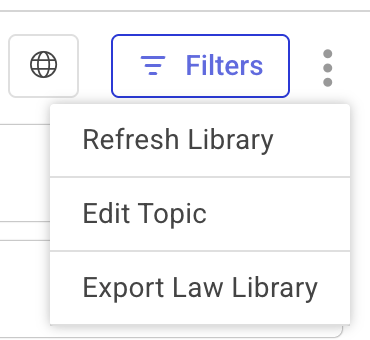
Click the ellipsis (⋮) icon next to the Filters button in the top-right section.
-
Select Edit Topic from the dropdown menu.
-
The Edit Topic page appears, displaying all available categories in the topic.
-
Regology organizes Authority Documents hierarchically. For example, marketing regulations are listed under Regulatory Compliance Risk > Marketing Regulation.
-
Make necessary updates to the topic hierarchy.
-
Click Done to apply changes.
-
The Edit Topic modal appears for reviewing changes.
-
Click Save to confirm updates or Cancel to discard them and return to the Edit Topic page.
Note:
-
To export documents from the Law Library, click the 'Export Law Library' button to download the current document structure for reference or external use.
-
To refresh the library, click Refresh Library to ensure all updates are reflected in the system immediately.
-
If applicable, use the Switch Language (globe icon) button to view the library in the original language. By default, the Law Library is displayed in English.
Viewing Law Library Topic
-
Click Expand All to view all categories.
-
Click Collapse All to display only level-1 categories.
-
Use the Search field to locate specific categories.
Resetting the Law Library topic
-
Click the Reset button to restore the original list of Authority Documents, discarding any unsaved changes.
-
Confirm the reset by clicking Yes in the prompt that appears.
Managing Law Library Topic
Adding Topic
-
Click the + icon next to an existing category to add a sibling category.
-
Enter a name in the Add Name field or rename the existing topic.
-
Assign a unique ID in the Add ID field.
-
Use the drag-and-drop handles to adjust the category's position within the hierarchy.
Deleting Topic
-
Click the Delete icon next to a category.
-
Confirm deletion to remove it from the hierarchy.